

Migrating from Adyen to Adyen Checkout
Spreedly offers two integrations with Adyen:
- Adyen: Adyen's classic Payment API (v68), authenticated with a username and password.
- Adyen Checkout: Adyen's current Checkout API (v71), authenticated with an API key.
Both connect to Adyen, but Spreedly considers them different gateway types. This guide explains what to change on Spreedly and Adyen, and what behaves differently after you move.
Spreedly & Adyen recommend using the Adyen Checkout connection.
Using Adyen Checkout
1. Set up your Adyen account
In the Adyen Dashboard:
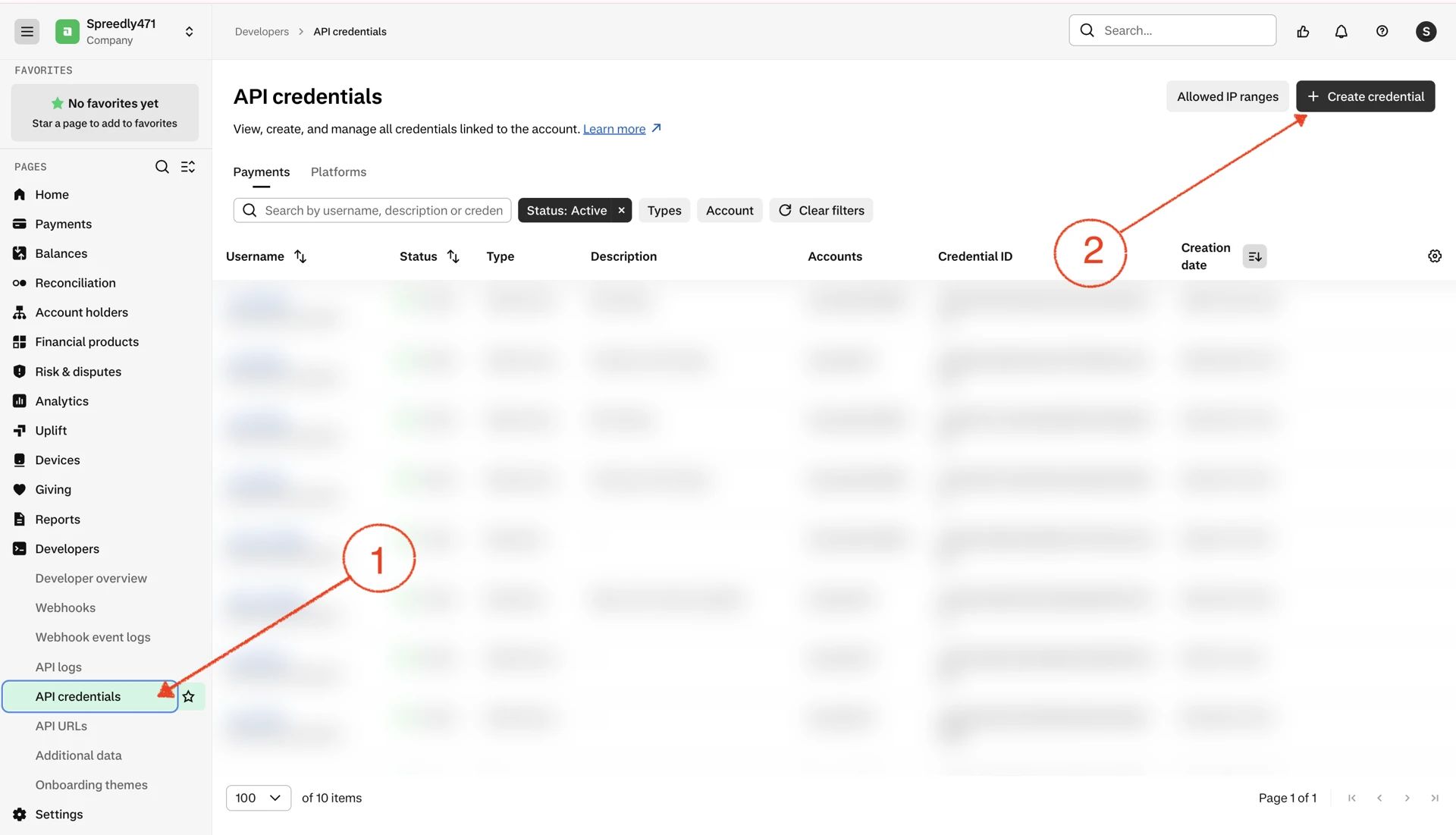
- Create an API credential and API key:
- Go to Developers > API credentials and select Create credential.
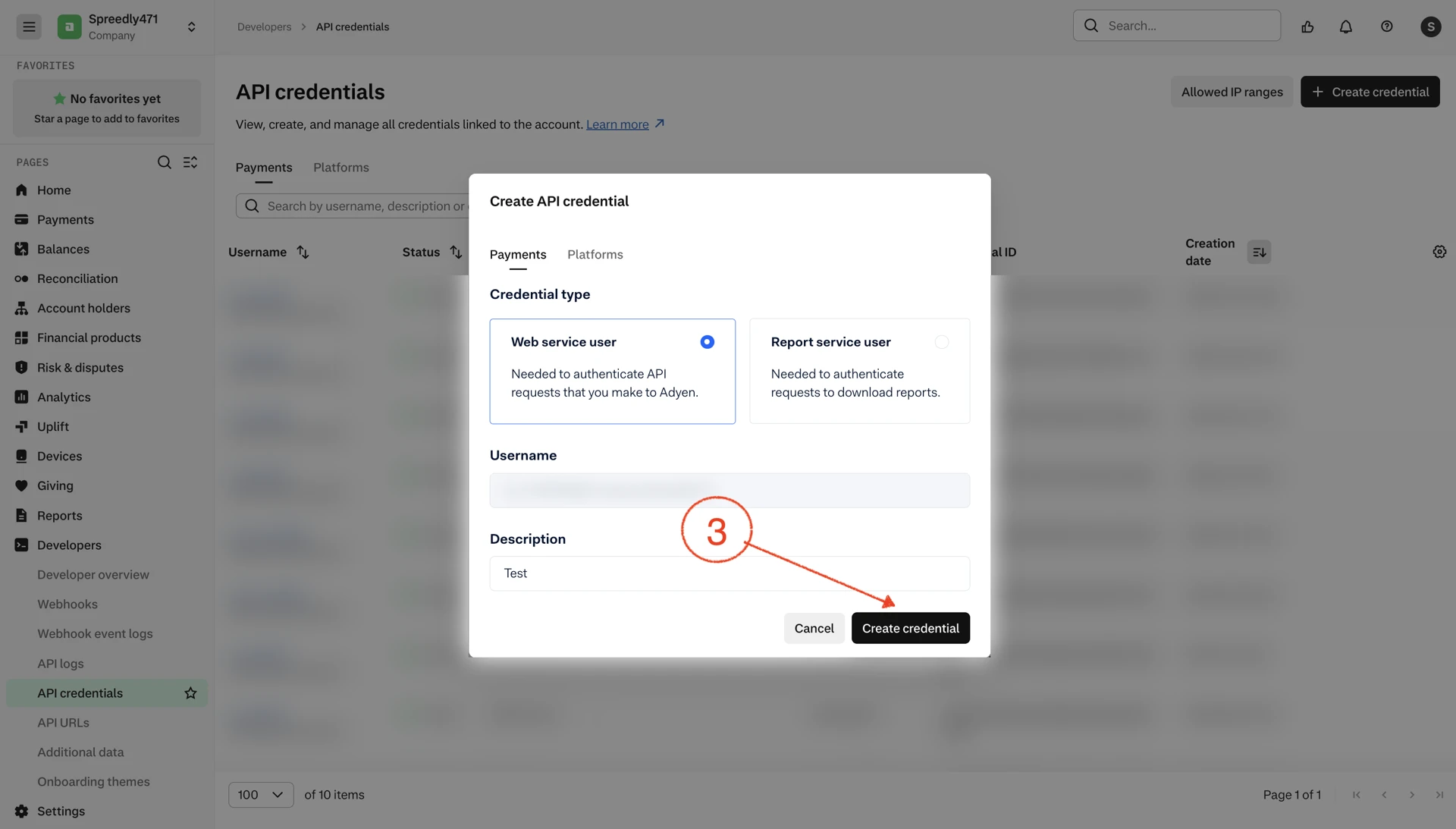
- Under Payments, select Web service user, add a description, and select Create credential.
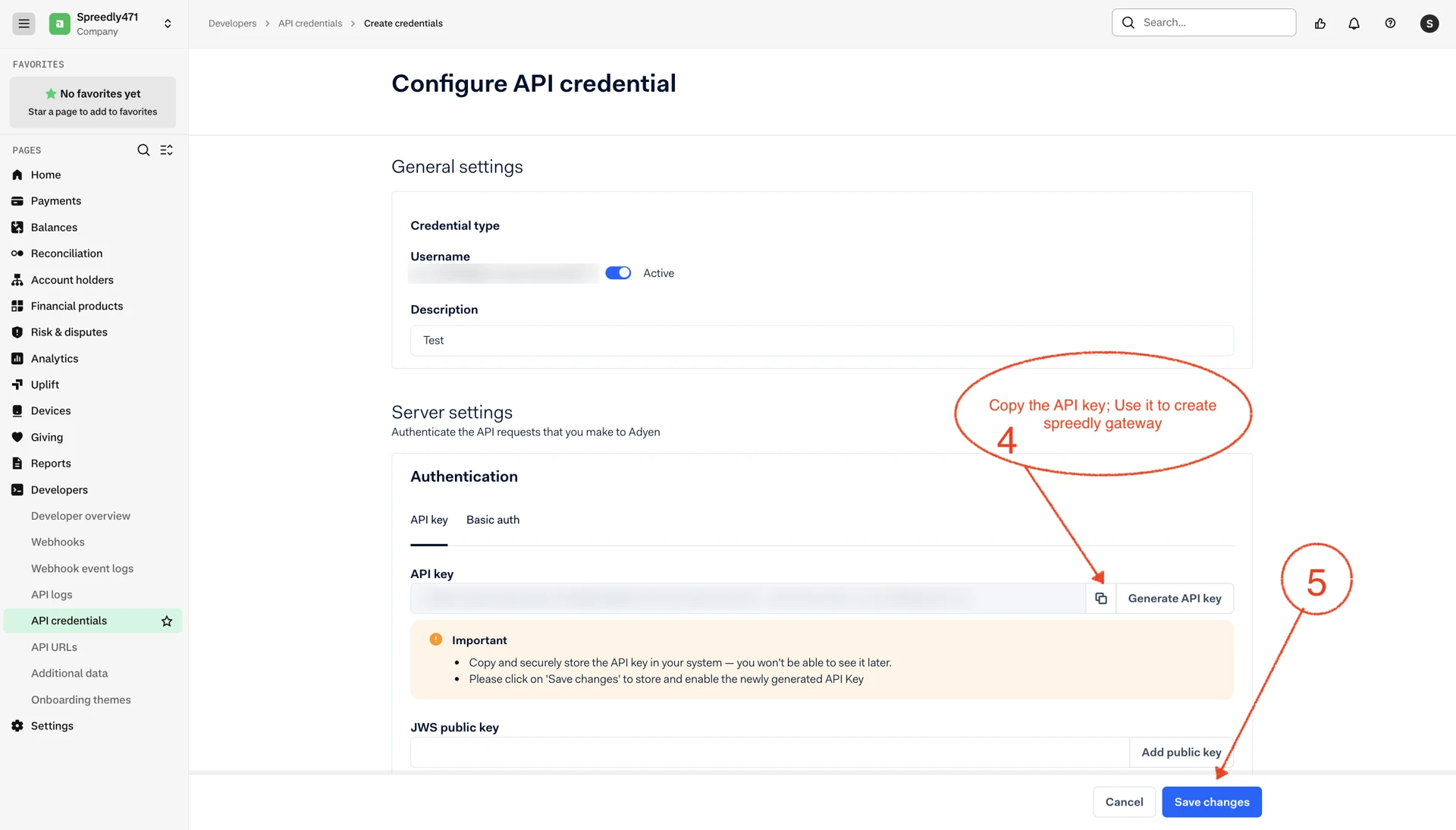
- Under Server settings > Authentication > API key, select Generate API key.
- Copy and store the API key securely. Adyen does not display it again after you leave the page.
- Select Save changes.
- Follow the Adyen API key instructions if you need additional detail.
- Create a live URL prefix to perform live transactions. You can contact the Adyen team for this. This is not needed in sandbox.
- Ask Adyen to enable any of these that you use. They are disabled by default:
- Immediate capture, if you use Spreedly
purchase. - Multi-capture, if you capture one authorization more than once.
- Multi-refund, if you refund one payment more than once.
- Immediate capture, if you use Spreedly
2. Configure webhooks (required)
Follow the Adyen Checkout webhook setup guide to configure the webhook and generate its HMAC key.
This setup is required. Without a valid webhook, capture, void, and refund transactions remain in processing.
3. Add an Adyen Checkout gateway
You can use the Spreedly app or an API call.
Option 1: Create gateway from the Spreedly app
- Open the dashboard: https://app.spreedly.com/connect/all-connections
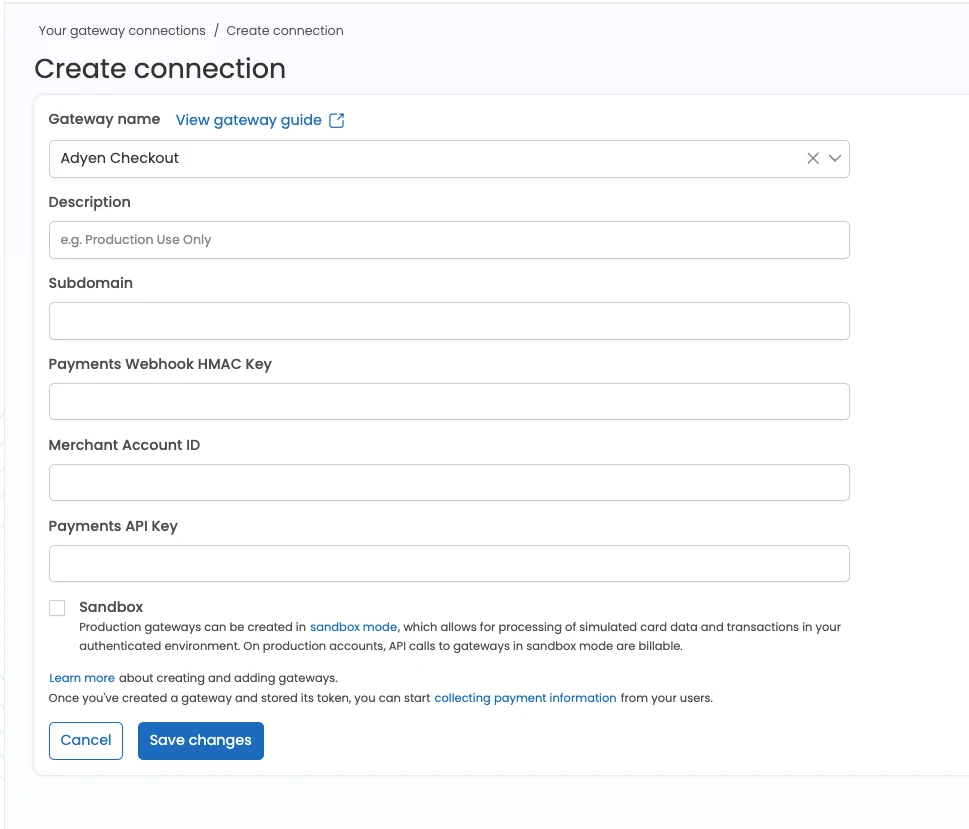
- Click Create connection > search for and select Adyen Checkout.
- Input your API key, HMAC key, subdomain (for live gateway), and merchant account ID, and submit the form.
Option 2: Create gateway using the Spreedly API
Call the gateway creation API:
curl https://core.spreedly.com/v1/gateways.xml \
  -u 'EnvironmentKey:AccessSecret' \
  -H 'Content-Type: application/xml' \
  -d '<gateway>
        <gateway_type>adyen_checkout</gateway_type>
        <merchant_account>YourMerchantAccount</merchant_account>
        <api_key>YourCheckoutApiKey</api_key>
        <hmac_key>YourWebhookHmacKey</hmac_key>
        <subdomain>YourLiveUrlPrefix</subdomain>
      </gateway>'
subdomain is required in live mode only. Enter just the prefix from https://{subdomain}-checkout-live.adyenpayments.com.
4. Test in sandbox, then go live
Create a sandbox Adyen Checkout gateway and run through the testing checklist. Then create your live gateway, configure the live webhook with your live HMAC key, and move new traffic over.
What changes between 'Adyen' & 'Adyen Checkout'
Capture, void, and refund
This is the most important behavioral difference.
On the Adyen gateway connection, a capture, void, or refund succeeds or fails as soon as Adyen accepts the request.
On Adyen Checkout, these operations are asynchronous:
- Spreedly returns the transaction in the
processingstate. - Adyen processes the request and sends a webhook.
- Spreedly updates the transaction to
succeededorgateway_processing_failed.
Authorize and purchase are still synchronous, except for gateway-specific 3DS transactions.
Capture behavior
| Adyen gateway | Adyen Checkout |
|---|---|
Capture follows your merchant account setting. The manual_capture field overrides it per transaction. | authorize is always manual capture. purchase captures immediately once Adyen enables immediate capture. |
If you previously relied on authorize being auto-captured, send purchase instead, or capture explicitly. If you used purchase with manual_capture, use authorize followed by capture.
capture_delay_hours is still supported.
3DS
- Continue sending
attempt_3dsecure: truefor Adyen-handled (gateway-specific) 3DS. - For browser-based 3DS2, also send the new
originfield, along withuser_agentandaccept_header. - Third-party 3DS2 fields are unchanged.
Not available on Adyen Checkout
| Feature | What to do instead |
|---|---|
| General credit (unreferenced refunds) | Use Spreedly's Adyen gateway integration for general credit. |
Gateway-specific field changes
Most fields carry over unchanged. Update or remove these if you are using them:
| Adyen field | Adyen Checkout field |
|---|---|
manual_capture | Removed as a GSF. |
recurring_detail_reference | Not supported by Adyen Checkout. |
recurring_contract_type | Use recurring_processing_model (CardOnFile, Subscription, UnscheduledCardOnFile). |
fund_source | Use fund_origin. |
fund_destination | Use fund_recipient. |
sub_merchant_mcc | Pass inside sub_merchant_data, for example {"sub_merchant_data": {"subMerchantMCC": "7999"}}. |
selected_brand | Use brand_override. |
localized_shopper_statement, update_shopper_statement, nationality, mcc | Not supported by Adyen Checkout. |
New fields on Adyen Checkout:
| Field | Purpose |
|---|---|
origin | Browser origin for web 3DS2. |
shopper_email | Shopper email for fraud checks and 3DS. |
line_items | Basket details for partial refunds and some payment methods. |
capture_psp_reference | Identifies which capture to refund when there are multiple captures. |
merchant_refund_reason | Refund reason: FRAUD, CUSTOMER REQUEST, RETURN, DUPLICATE, OTHER. |
See the Adyen Checkout gateway guide for the full field list.
Implementation checklist
- Immediate capture, multi-capture, and multi-refund enabled by Adyen as needed.
- Sandbox webhook configured with the sandbox HMAC key.
- Sandbox gateway created with
merchant_account,api_key,hmac_key, andsubdomain. - Gateway-specific fields mapped.
Testing checklist
- Purchase succeeds with existing and new payment methods.
- Authorize, then capture. Capture moves from
processingtosucceeded. - Void and refund move from
processingtosucceeded. - Partial or multiple captures and refunds work, if you use them.
- 3DS flow completes, if you use Adyen 3DS.
- Purchase and authorize work with 3DS Global.
- Recurring payment sends the expected stored-credential values.
- Call the Store payment method API with GSF
tokenize_only: true, then call Redact payment method to remove (unvault) it from the gateway side.
Go-live checklist
- Immediate capture, multi-capture, and multi-refund enabled by Adyen as needed on production accounts.
- Live webhook configured with the live HMAC key for production accounts.
- Non-sandbox gateway token created with
merchant_account,api_key,hmac_key, andsubdomainfor production accounts. - Implementation updated to point at production account information.
- UAT & tests in production for final validation.
Updated 14 days ago