

How Composer works
How Composer works
There are three components to Composer:
- The Composer Server SDKs: These are responsible for interacting with the Composer API and offer helpers to standardize and simplify whether or not to allow a request to proceed. They allow you to execute checkpoints.
- The Composer Client SDKs: These are responsible for device identification, behavior tracking, executing tracking services from configured integrations, and displaying user friction required by a Composer checkpoint (e.g. MFA, IDV, KYC).
- The Composer console: This is where you configure which integrations should run, whether a request should be allowed to proceed (via checkpoints), and if a human needs to be alerted to investigate suspected fraud.
Understanding the flow
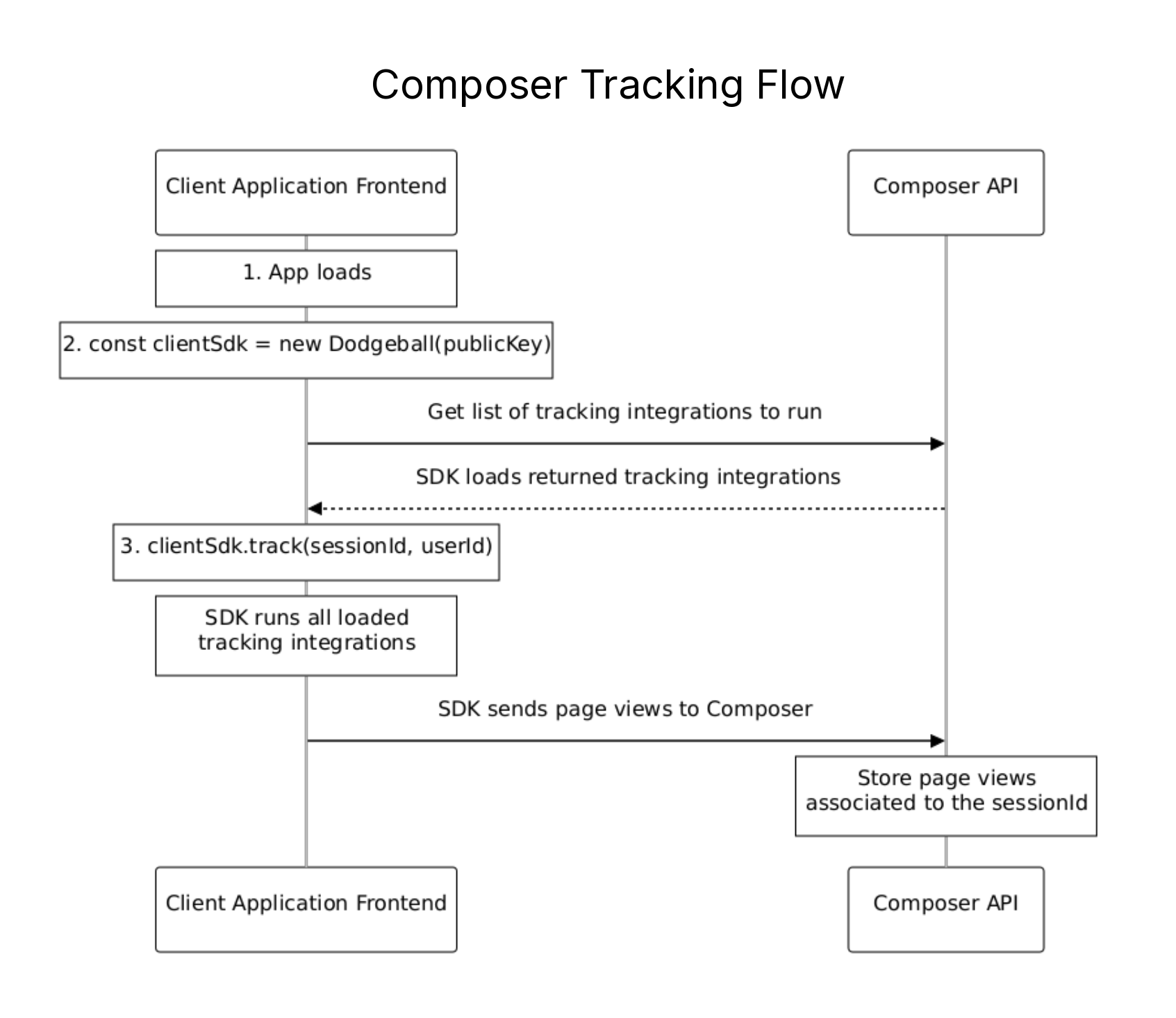
Tracking users
Tracking usage builds a profile of site users in the Composer Customer Data Platform. This data is accessible for review in the Customer profile in the Composer console. This data may also be used in a Composer checkpoint to inform a decision.
The Tracking function also automatically enables data collection for any configured third-party integrations that require this information.
It is possible to execute Composer checkpoints without the benefit of this usage data. Tracking users is optional if none of the above use cases are required.
Tracking is performed through the Composer Client SDKs.
Protecting your application
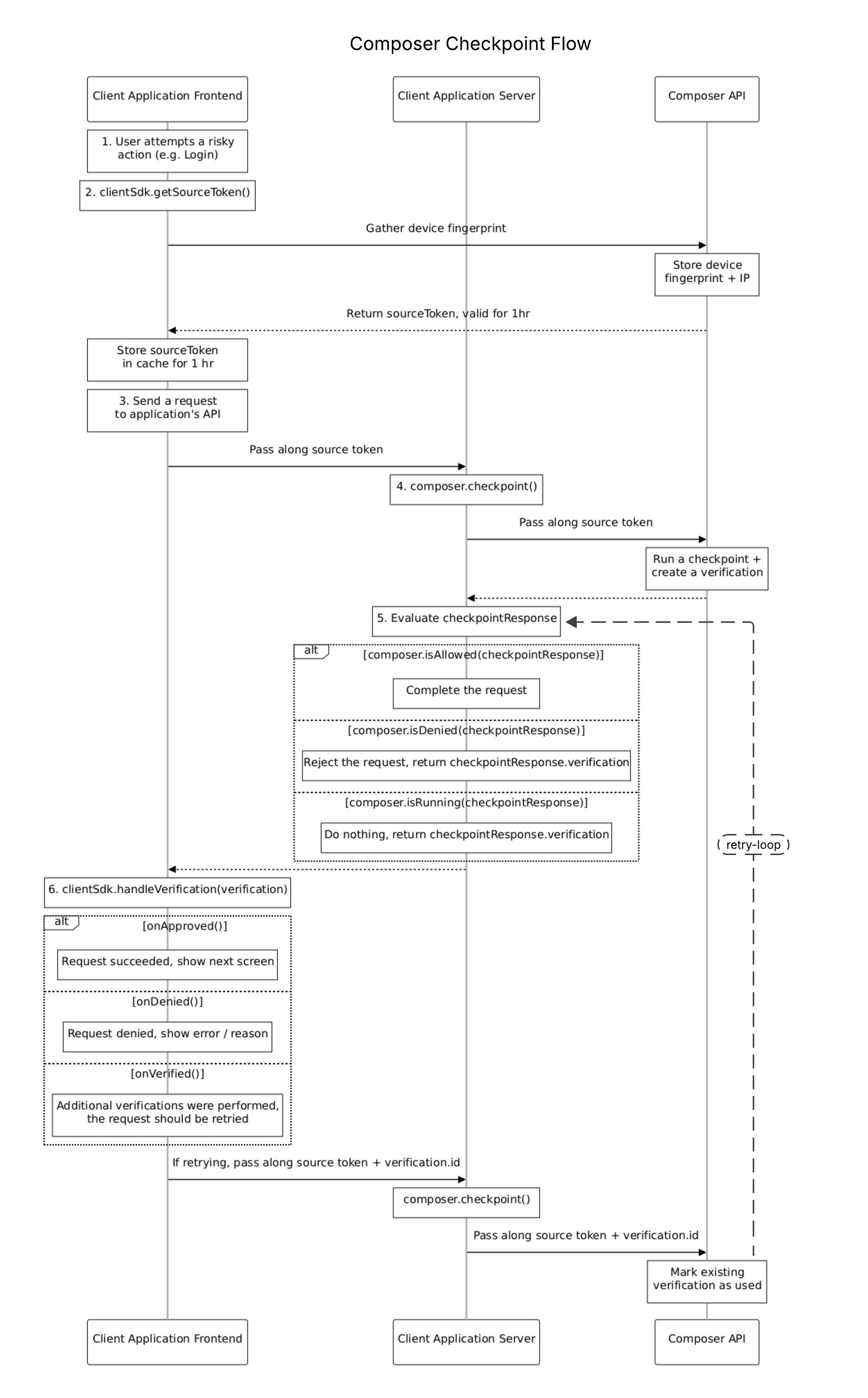
- Composer secures any risky action. A risky action is one that may open your application up to fraud (e.g. Registration, Login, Payments, Posting a Listing).
- To identify who is attempting the risky action, Composer fingerprints the device and returns a token representing the source.
- When you make a request to your API, send along the source token.
- Before taking any action, verify that the request should be allowed to proceed by calling a Composer checkpoint. Checkpoints can be called whatever you want (e.g.
BOOK_A_RIDE,MAKE_RESERVATION,POST_LISTING) and can be updated to protect your application without having to touch code. - The checkpoint will run and create a new verification, which tells your application how to proceed:
- If allowed, you should complete the request and return a successful response.
- If denied, you should reject the request and return the verification that was performed — it'll contain a denial message to display to the user.
- If pending, no determination on how to proceed has been reached yet. This happens when the checkpoint needs to gather additional information, such as an MFA code or picture of a government ID. You should take no action and return the verification that was performed.
- When you get a response from your API, use Composer to parse the verification returned, which determines the correct callback to invoke:
- When the request is allowed, inform the user — either by progressing to the next screen in a flow or displaying a success message.
- When the request is denied, display a denial message to the user.
- If additional information was gathered from the user and they are now allowed to proceed, retry the request to your API, being sure to pass along the ID of the verification that was performed.
- If a verification ID is sent along with a request to your API, send it to the Composer checkpoint. Composer will check if the verification is complete and allowed to proceed. If so, it will be marked as used (to prevent replay attacks) and the request will be allowed to proceed.
Updated 1 day ago
Did this page help you?