

Securing iFrame or Checkout SDK
Understanding script security best-practices and requirements to maintain compliance with PCI-DSS 4.0
iFrame security
Payment processing using Spreedly for tokenization requires the secure handling of sensitive customer data. Spreedly's iFrame payment form provides a secure, PCI-compliant method for collecting payment information directly from your customers' browsers, minimizing compliance burden.
However, the security of this integration relies on properly securing the communication channel between your application and the iframe. This document outlines the essential security measures for your payment pages, including robust measures such as session authentication, which is critical for preventing unauthorized use and protecting against common web vulnerabilities. Detailed information on the lifecycle and implementation of session authentication, including parameters like nonces and signatures, is available in the iFrame Lifecycle guide, and mentioned here to provide a comprehensive understanding of payment page security.
Payment Page Considerations
Including the iFrame Javascript file on a checkout page does not automatically load the library. The iFrame’s lifecycle must be explicitly managed for successful payment processing.
Providing all required parameters in every function call is crucial for successful payments and helps to fortify payment pages from bot attacks that test stolen credit card numbers. These steps establish a properly-configured iFrame integration for PCI-compliant card tokenization.
Security Requirements
Legacy iFrame (version 1.140 and older) and non-secure tokenization will be deprecated on October 31, 2026, with end of life on December 31, 2028. See the iFrame payment form guide for what's changing and how to stay supported.
Securing the iFrame is critical to minimizing card testing and other automated fraud attempts via botnets. An unsecured iFrame can be exploited as an entry point for malicious scripts that test stolen card details at scale, bypassing frontend protections. Merchants can significantly reduce exposure to this abuse by implementing robust security measures. This includes authenticating all iFrame requests using secure tokenization described here, and by following our Step-by-Step guide.
With a secure iFrame as a strong foundation, businesses can further improve protections by configuring proper security headers and applying bot-mitigation techniques such as rate limiting and token validation, among other strategies. These steps can help businesses protect both their customers and their payment pages, with iFrame as a secure component of the overall payment flow.
Enabling authentication
To enable authentication of your Create payment method API calls via iFrame, visit the environment settings page in app.spreedly.com.
We recommend selecting iFrame or Express only, and ensuring iFrame is properly configured with the arguments for secure tokenization prior to enabling its setting under "Enhanced Security". Once saved, transactions are authenticated from iFrame in this environment only, using a session nonce + signature and timestamp.
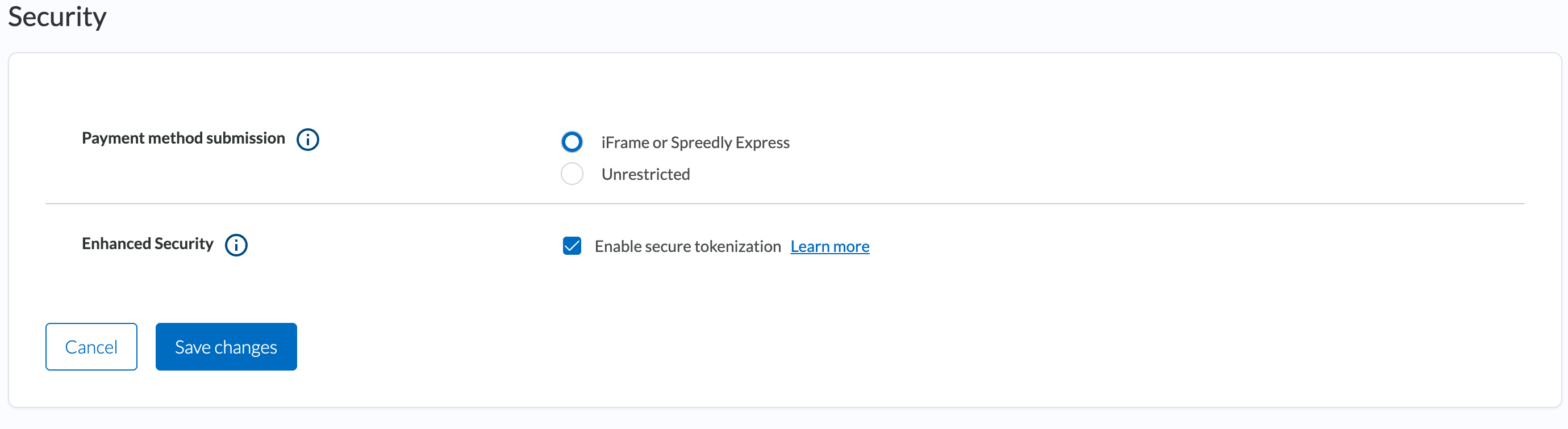
Note: When enabled, all Create payment method calls will be impacted and require authentication. This includes iFrame using the described session nonce authentication mechanism, or basic HTTP authorization for payment methods tokenized via API.
Payment Card Industry (PCI) Compliance
To achieve the highest level of PCI-DSS 4.0 compliance using iFrame, disable the creation of payment methods via direct API. After confirming any alternative methods of adding a payment method are not in use, enable the "iFrame or Spreedly Express only" option from the Environment settings page in the Spreedly application.
This prevents direct API submission of payment methods which is required to detect malicious attacks and, in general, enforce adherence to the PCI standard. The only way payment methods can be added to this environment is via the iFrame (or Express) payment forms.
PCI-DSS 4.0
Starting March 31, 2025, all merchants will be subject to new payment page requirements under the updated PCI standards. One key aspect of these new requirements is the emphasis on script security for protecting sensitive cardholder data and PII on client-side environments, particularly as applied to any third-party script merchants use on their payment pages.
Under PCI-DSS 4.0, script integrity on payment pages must be explicitly verified and managed. Scripts must be sourced from trusted providers like Spreedly, securely implemented, and must be necessary for functionality on the payment page. The standard introduces requirements such as script monitoring, the need for a Content Security Policy, or sub-resource integrity to certify that scripts loaded on the page are not tampered with. Merchants must also include written justification as to why each script is necessary as part of their payment page script inventory.
Content Security Policy
Content Security Policy (CSP) adds a layer of security to your payment page, aimed at mitigating attacks like Cross-Site Scripting (XSS). By specifying trusted domains for the browser, CSP restricts the executable script sources and reduces vectors where XSS can occur. A well-configured CSP may help assist with restrictions on unauthorized or malicious scripts from being loaded and executed. For iFrame, include the following directives to ensure proper loading of iFrame assets.
script-src https://*.spreedly.com https://www.datadoghq-browser-agent.com
child-src https://*.spreedly.com data:
iframe-src https://*.spreedly.com data:
connect-src https://.spreedly.com https://datadoghq-browser-agent.com https://browser-intake-datadoghq.com https://.checkouttools.com
CSP for 3D Secure
If you process 3DS authentication, your payment page involves two sets of origins beyond those needed to load Spreedly's scripts. Allowing only the Spreedly origins is a common cause of 3DS failing in production while tokenization continues to work normally.
The 3DS provider script
3DS2 Global routes authentication through Forter, served from a Spreedly-controlled domain. Add it to script-src:
script-src https://plugins.spreedly.com;If this is blocked, the SDK loads and tokenization succeeds, but 3DS authentication silently fails to initialize.
The issuer's challenge iframe
When a challenge is required, an authentication form is rendered in an iframe on your page. That iframe is served by the cardholder's issuing bank, through their Access Control Server (ACS), and the domain is selected dynamically per transaction based on the card being used.
Spreedly cannot provide an allowlist of ACS domains, and we recommend against building one. ACS domains are controlled by issuers and their 3DS vendors, number in the hundreds, and change over time as issuers migrate between vendors. A static list will be incomplete the day it ships, and as it ages it will silently decline transactions for real cardholders. This is a property of the 3DS protocol rather than of Spreedly's implementation, so it applies equally to any payments provider.
On the page hosting your checkout and challenge, and scoped to that page rather than site-wide, we recommend:
| Directive | Recommendation | Why |
|---|---|---|
| frame-src | https: | Allows the challenge iframe to load from any HTTPS origin, including whichever ACS the issuer selects |
| form-action | Broadened to match | The challenge result posts back to the ACS. If this stays restricted, the frame renders but the challenge cannot complete |
| connect-src | Broadened to match | Required for device fingerprinting during authentication |
If your security requirements don't permit https:, you can layer wildcards for major 3DS vendors on top of a permissive fallback. A vendor list should never be the entire policy on its own.
If the challenge frame loads but renders blank, and your console shows no CSP violation, the cause is different: check whether the issuer's page sets X-Frame-Options or a restrictive frame-ancestors. That's controlled by the issuer and can't be resolved through your own CSP.
For the full challenge flow this applies to, see 3DS with the Checkout SDK or the 3DS2 Global Integration Guide for Web.
Script integrity
Merchants must verify and maintain script integrity for any third-party asset running on their payment page. This can be done using a combination of techniques and includes a number of varying mechanisms. Key examples are sub-resource integrity (SRI), file-integrity monitoring (FIM), manual review and whitelisting, or leveraging of other third-party providers to inspect their inventory, notifying and potentially blocking requests to any unauthorized or altered scripts running on the page.
This requirement applies to all third-party scripts on a payment page, including Spreedly's iFrame. To that end, Spreedly supports these integrity mechanisms, enabling merchants to comply with this requirement. For ease of accessibility, Spreedly publishes the version number and integrity hash for the most recent version of iFrame here.
A straightforward implementation of SRI, for example, would involve updating your iframe implementation to pin to a specific version of the script and providing the corresponding SRI hash value in the script tag. This could look like:
<head>
  <script src="https://core.spreedly.com/iframe/iframe-1.158.min.js" integrity="sha384-D8OIQOcHJl+1ANw5fBEV1ZqcGn3t3etLFeuDnmg6jfQpv/W8XhEhUhTYM4BnOCH/"
crossorigin="anonymous"></script>
</head>
Replace sha384-D8OIQOcHJl+1ANw5fBEV1ZqcGn3t3etLFeuDnmg6jfQpv/W8XhEhUhTYM4BnOCH/ with the SRI hash for that specific version in the script tag. The crossorigin="anonymous" attribute is used to ensure that the integrity check is performed correctly.
Each time the script tag is updated to a different version, there is also a different corresponding SRI hash. To find this for your desired version of iframe, use a command-line tool like openssl or an online SRI hash generator for the correct base64-encoded hash.
A strict implementation of SRI using iframe's v1, stable or candidate release channels can be challenging due to the frequent update cadence for those versions. Therefore, if your solution to the script integrity requirements for PCI 4.0 hinges on SRI hash validation, we recommend pinning to a specific version of the script instead. The release channels can be more compatible with other solutions to this requirement, if you would like to continue using them.
Note: This solution is impacted by recent changes to our iframe deprecation policy, which ensure merchants are able to leverage a script integrity mechanism on recent, supported versions of the script.
Those pinning to a version of the script will need to update to a newer version at an annual cadence according to the iframe deprecation cycle for each version, or where required for security updates. Pinning to recent versions of the script may also be desired to take advantage of the latest feature enhancements, bug fixes and other updates.
We recommend discussing the best approach for your payment page scripts with a Qualified Security Assessor (QSA) before implementing any solution to this requirement.
Script inventory
Another aspect of PCI-DSS 4.0 is the requirement for merchants to keep an inventory of all third-party scripts on their payment page, along with the justification for usage as part of the page's functionality.
For the Spreedly iFrame, an example justification could relate to the need for secure tokenization of cardholder data, including PAN and CVV, as part of the overall payment flow.
Updated 3 days ago