

Adyen Checkout gateway guide
Quick Start
New to integrating Adyen Checkout with Spreedly? Here's your setup guide:
- Retrieve your Adyen Checkout credentials:
- Create a Checkout API credential (
api_key) and note yourmerchant_accountin the Adyen Customer Area. - Generate an HMAC key and configure Adyen webhooks to Spreedly. This is mandatory for capture, void, and refund transactions. See the webhook setup guide below.
- Contact Adyen to enable immediate capture, multi-capture, and multi-refund if needed. These features are disabled by default.
- Create a Checkout API credential (
- Get familiar with the Spreedly API:
- Review Spreedly API basics.
- Review Gateways, Payment Methods, and Transactions.
- Add an Adyen Checkout gateway to Spreedly in sandbox mode.
Review this documentation to understand more about how to test transactions.
| Additional notes |
|---|
|
Adding an Adyen Checkout gateway
Required credentials
merchant_account: Your Adyen merchant account code.api_key: Your Adyen Checkout API key. Spreedly sends it to Adyen in theX-API-Keyheader.hmac_key: The hex-encoded HMAC key used to validate Adyen webhook notifications. It is required so capture, void, and refund transactions can reach a final state.subdomain: Your Adyen live URL prefix. Enter only the{subdomain}portion of your live endpoint:https://{subdomain}-checkout-live.adyenpayments.com. It is required in live mode and can be omitted in sandbox mode.
Request
curl https://core.spreedly.com/v1/gateways.xml \
  -u 'EnvironmentKey:AccessSecret' \
  -H 'Content-Type: application/xml' \
  -d '<gateway>
        <gateway_type>adyen_checkout</gateway_type>
        <merchant_account>YourMerchantAccount</merchant_account>
        <api_key>YourCheckoutApiKey</api_key>
        <hmac_key>YourWebhookHmacKey</hmac_key>
        <subdomain>some-domain</subdomain>
      </gateway>'
Response
<gateway>
    <token>4DYT7DJYX98DEVNFPNFMT0XIOOA</token>
    <gateway_type>adyen_checkout</gateway_type>
    <name>Adyen Checkout</name>
    <description nil="true"/>
    <merchant_profile_key nil="true"/>
    <sub_merchant_key nil="true"/>
    <merchant_account>Spreedly007</merchant_account>
    <characteristics>
        <supports_purchase type="boolean">true</supports_purchase>
        <supports_authorize type="boolean">true</supports_authorize>
        <supports_capture type="boolean">true</supports_capture>
        <supports_partial_capture type="boolean">true</supports_partial_capture>
        <supports_credit type="boolean">true</supports_credit>
        <supports_partial_credit type="boolean">true</supports_partial_credit>
        <supports_void type="boolean">true</supports_void>
        <supports_verify type="boolean">true</supports_verify>
        <supports_reference_purchase type="boolean">false</supports_reference_purchase>
        <supports_purchase_via_preauthorization type="boolean">false</supports_purchase_via_preauthorization>
        <supports_offsite_purchase type="boolean">false</supports_offsite_purchase>
        <supports_offsite_authorize type="boolean">false</supports_offsite_authorize>
        <supports_offsite_synchronous_purchase type="boolean">false</supports_offsite_synchronous_purchase>
        <supports_offsite_synchronous_authorize type="boolean">false</supports_offsite_synchronous_authorize>
        <supports_3dsecure_purchase type="boolean">true</supports_3dsecure_purchase>
        <supports_3dsecure_authorize type="boolean">true</supports_3dsecure_authorize>
        <supports_3dsecure_2_mpi_purchase type="boolean">true</supports_3dsecure_2_mpi_purchase>
        <supports_3dsecure_2_mpi_authorize type="boolean">true</supports_3dsecure_2_mpi_authorize>
        <supports_store type="boolean">true</supports_store>
        <supports_remove type="boolean">true</supports_remove>
        <supports_fraud_review type="boolean">false</supports_fraud_review>
        <supports_network_tokenization type="boolean">true</supports_network_tokenization>
        <supports_inquire_by_gateway_transaction_id type="boolean">false</supports_inquire_by_gateway_transaction_id>
        <supports_inquire_by_order_id type="boolean">false</supports_inquire_by_order_id>
        <supports_transaction_retry type="boolean">false</supports_transaction_retry>
        <supports_stored_stored_credentials type="boolean">false</supports_stored_stored_credentials>
        <supports_3dsecure_2_purchase type="boolean">true</supports_3dsecure_2_purchase>
        <supports_3dsecure_2_authorize type="boolean">true</supports_3dsecure_2_authorize>
        <supports_stored_credentials type="boolean">true</supports_stored_credentials>
        <supports_card_scheme_ntid type="boolean">true</supports_card_scheme_ntid>
        <supports_moto_exemption type="boolean">true</supports_moto_exemption>
        <supports_low_value_exemption type="boolean">true</supports_low_value_exemption>
    </characteristics>
    <credentials>
        <credential>
            <name>merchant_account</name>
            <value>Spreedly007</value>
        </credential>
    </credentials>
    <gateway_settings>
        <subdomain nil="true"/>
    </gateway_settings>
    <gateway_specific_fields>
        <gateway_specific_field>shopper_reference</gateway_specific_field>
        <gateway_specific_field>shopper_statement</gateway_specific_field>
        <gateway_specific_field>fraud_offset</gateway_specific_field>
        <gateway_specific_field>delivery_date</gateway_specific_field>
        <gateway_specific_field>merchant_order_reference</gateway_specific_field>
        <gateway_specific_field>shopper_email</gateway_specific_field>
        <gateway_specific_field>installments</gateway_specific_field>
        <gateway_specific_field>brand_override</gateway_specific_field>
        <gateway_specific_field>custom_routing_flag</gateway_specific_field>
        <gateway_specific_field>risk_data</gateway_specific_field>
        <gateway_specific_field>shopper_ip</gateway_specific_field>
        <gateway_specific_field>threed_dynamic</gateway_specific_field>
        <gateway_specific_field>origin</gateway_specific_field>
        <gateway_specific_field>user_agent</gateway_specific_field>
        <gateway_specific_field>accept_header</gateway_specific_field>
        <gateway_specific_field>device_fingerprint</gateway_specific_field>
        <gateway_specific_field>authorisation_type</gateway_specific_field>
        <gateway_specific_field>requested_test_acquirer_response_code</gateway_specific_field>
        <gateway_specific_field>industry_usage</gateway_specific_field>
        <gateway_specific_field>capture_delay_hours</gateway_specific_field>
        <gateway_specific_field>splits</gateway_specific_field>
        <gateway_specific_field>line_items</gateway_specific_field>
        <gateway_specific_field>recurring_detail_reference</gateway_specific_field>
        <gateway_specific_field>sub_merchant_id</gateway_specific_field>
        <gateway_specific_field>sub_merchant_name</gateway_specific_field>
        <gateway_specific_field>sub_merchant_street</gateway_specific_field>
        <gateway_specific_field>sub_merchant_city</gateway_specific_field>
        <gateway_specific_field>sub_merchant_state</gateway_specific_field>
        <gateway_specific_field>sub_merchant_postal_code</gateway_specific_field>
        <gateway_specific_field>sub_merchant_country</gateway_specific_field>
        <gateway_specific_field>sub_merchant_tax_id</gateway_specific_field>
        <gateway_specific_field>sub_merchant_data</gateway_specific_field>
        <gateway_specific_field>merchant_application</gateway_specific_field>
        <gateway_specific_field>level_2_data</gateway_specific_field>
        <gateway_specific_field>level_3_data</gateway_specific_field>
        <gateway_specific_field>additional_data_airline</gateway_specific_field>
        <gateway_specific_field>additional_data_lodging</gateway_specific_field>
        <gateway_specific_field>store</gateway_specific_field>
        <gateway_specific_field>date_of_birth</gateway_specific_field>
        <gateway_specific_field>fund_origin</gateway_specific_field>
        <gateway_specific_field>address_override</gateway_specific_field>
        <gateway_specific_field>metadata</gateway_specific_field>
        <gateway_specific_field>street</gateway_specific_field>
        <gateway_specific_field>house_number_or_name</gateway_specific_field>
        <gateway_specific_field>platform_chargeback_logic</gateway_specific_field>
        <gateway_specific_field>capture_psp_reference</gateway_specific_field>
        <gateway_specific_field>merchant_refund_reason</gateway_specific_field>
        <gateway_specific_field>recurring_processing_model</gateway_specific_field>
        <gateway_specific_field>tokenize_only</gateway_specific_field>
        <gateway_specific_field>shopper_interaction</gateway_specific_field>
        <gateway_specific_field>network_transaction_id</gateway_specific_field>
        <gateway_specific_field>verify_amount</gateway_specific_field>
        <gateway_specific_field>idempotency_key</gateway_specific_field>
        <gateway_specific_field>cancel_or_refund</gateway_specific_field>
    </gateway_specific_fields>
    <payment_methods>
        <payment_method>credit_card</payment_method>
        <payment_method>bank_account</payment_method>
        <payment_method>apple_pay</payment_method>
        <payment_method>google_pay</payment_method>
        <payment_method>third_party_token</payment_method>
        <payment_method>third_party_network_token</payment_method>
    </payment_methods>
    <state>retained</state>
    <redacted type="boolean">false</redacted>
    <sandbox type="boolean">true</sandbox>
    <mode>default</mode>
    <created_at type="dateTime">2026-08-19T08:40:26Z</created_at>
    <updated_at type="dateTime">2026-08-19T08:40:26Z</updated_at>
</gateway>
Specifying a merchant subdomain
Create a live URL prefix in the Adyen Customer Area and pass it as the subdomain gateway setting. Live requests use:
https://{subdomain}-checkout-live.adyenpayments.com/
Sandbox requests use https://checkout-test.adyen.com/ and do not require a subdomain.
Purchase (Auth and Capture)
curl https://core.spreedly.com/v1/gateways/[gateway_token]/purchase.json \
  -u 'EnvironmentKey:AccessSecret' \
  -H 'Content-Type: application/json' \
  -d '{
    "transaction": {
      "payment_method_token": "payment_method_token",
      "amount": 1000,
      "currency_code": "USD",
      "email": "[email protected]",
      "order_id": "some-order-id",
      "billing_address": {
        "name": "Jane Shopper",
        "address1": "123 Main St",
        "city": "New York",
        "state": "NY",
        "zip": "10001",
        "country": "US"
      },
      "gateway_specific_fields": {
        "adyen_checkout": {
          "shopper_reference": "shopper-12345",
          "idempotency_key": "550e8400-e29b-41d4-a716-446655440000"
        }
      }
    }
  }'
Advanced features
Capture and refund capabilities
Immediate capture, multi-capture, and multi-refund are disabled by default in Adyen. Contact Adyen to enable the capabilities required by your integration:
- Immediate capture: allows a Purchase to authorize and capture immediately.
- Multi-capture: allows multiple Capture requests against one authorization.
- Multi-refund: allows multiple Refund requests against one payment.
ACH / Bank Account Transactions
ACH payments must be enabled for the Adyen merchant account. Contact your Adyen account manager or Adyen Support if needed.
| Spreedly field | Adyen field |
|---|---|
routing_number | bankLocationId |
account_number | bankAccountNumber |
name | ownerName |
country | Billing/account country |
Store and remove
For Store:
- Pass a unique
shopper_referencefor each cardholder; do not use personally identifiable information. - Pass GSF
tokenize_only: trueto use Adyen's/storedPaymentMethodsendpoint without authorizing an amount. - Set
recurring_processing_modeltoCardOnFile,Subscription, orUnscheduledCardOnFilewhen required.
When removing a stored payment method with remove_from_gateway.
Stored Credentials
Adyen Checkout supports Spreedly's first-class stored-credential API. For any Authorize or Purchase request, send the stored-credential fields below so that Spreedly can populate the correct shopperInteraction, recurringProcessingModel, and additionalData.networkTxReference values in the Adyen Checkout payload.
Learn more about how Spreedly enables use of stored credentials by reviewing our Stored Credentials guide.
First / credential-on-file setup (CIT and MIT initial)
Send stored_credential_initial_transaction: true. Do not send stored_credential_network_transaction_id because the network returns it in the response to this transaction.
reason_type | initiator | shopperInteraction | recurringProcessingModel | networkTxReference |
|---|---|---|---|---|
installment | cardholder | Ecommerce | not sent | not sent |
recurring | cardholder | Ecommerce | Subscription | not sent |
unscheduled | cardholder | Ecommerce | CardOnFile | not sent |
Subsequent use
Send stored_credential_initial_transaction: false together with the stored_credential_network_transaction_id returned by Adyen on the initial transaction. Spreedly passes that value through as additionalData.networkTxReference.
reason_type | initiator | shopperInteraction | recurringProcessingModel | networkTxReference |
|---|---|---|---|---|
installment | merchant | ContAuth | not sent | sent |
installment | cardholder | Ecommerce | not sent | sent |
recurring | merchant | ContAuth | Subscription | sent |
recurring | cardholder | Ecommerce | Subscription | sent |
unscheduled | merchant | ContAuth | UnscheduledCardOnFile | sent |
unscheduled | cardholder | ContAuth | CardOnFile | sent |
- Adyen does not define a recurring model for installment payments, so
recurringProcessingModelis omitted forreason_type: installmentunless you send therecurring_processing_modelgateway-specific field. - For
reason_type: unscheduled, the initiator is evaluated together with the initial transaction flag. A cardholder-initiated unscheduled transaction isEcommerceonly on the initial transaction; subsequent unscheduled transactions are sent asContAuth. - The
shopper_interactionandrecurring_processing_modelgateway-specific fields override the values above. When no stored-credential fields are sent, Spreedly defaults toEcommercefor a live payment method andContAuthfor a vaulted token. - On an initial transaction where the initiator is
merchantand the payment method includes a CVV, Spreedly sendsEcommerce.
Third-party 3DS2 auth data
Spreedly maps third-party 3DS2 data to Adyen Checkout mpiData:
| Spreedly field | Adyen field |
|---|---|
three_ds_version | threeDSVersion |
ecommerce_indicator | eci |
authentication_value | cavv |
directory_server_transaction_id | dsTransID |
directory_response_status | directoryResponse |
authentication_response_status | authenticationResponse |
See the 3DS2 Third-party Authentication guide. For gateway-specific 3DS, set attempt_3dsecure: true. Set threed_dynamic: true to let Adyen Dynamic 3DS rules decide whether authentication is required. Web 3DS2 can also require origin, user_agent, and accept_header.
Idempotent Requests
Pass idempotency_key to send Adyen's Idempotency-Key header and safely retry a request. See Adyen API idempotency.
Gateway Specific Fields
Gateway-specific fields must be nested under adyen_checkout:
<gateway_specific_fields>
  <adyen_checkout>
    <shopper_reference>shopper-12345</shopper_reference>
    <shopper_statement>ACME*ORDER123</shopper_statement>
    <origin>https://your-shop.example.com</origin>
    <recurring_processing_model>CardOnFile</recurring_processing_model>
    <shopper_interaction>Ecommerce</shopper_interaction>
    <idempotency_key>550e8400-e29b-41d4-a716-446655440000</idempotency_key>
  </adyen_checkout>
</gateway_specific_fields>| Field Name | Type | Required | Use Case (Description) | Example Value |
|---|---|---|---|---|
shopper_reference | String | No | Unique shopper ID for recurring/tokenization. Required for Store and recurring payments; do not send PII. | shopper-12345 |
shopper_statement | String | No | Text shown on the shopper's bank statement (keep under approximately 22 characters). | ACME*ORDER123 |
fraud_offset | Integer | No | Value added to the Adyen risk score. | 5 |
delivery_date | String | No | ISO 8601 delivery date/time, sent as deliverAt. | 2026-07-02T12:00:00.000Z |
merchant_order_reference | String | No | Order reference linking related attempts and retries. | order-abc-123 |
shopper_email | String | No | Shopper email used for fraud checks and some 3DS flows. | [email protected] |
installments | Integer | No | Number of card installments. | 3 |
brand_override | Boolean/String | No | Forces Adyen overwriteBrand for co-branded cards. | false |
custom_routing_flag | String | No | Merchant-defined flag used by Adyen custom routing rules. | route-eu |
risk_data | Object | No | Custom inputs sent as additionalData.riskdata.*. | {"operatingSystem":"iOS"} |
shopper_ip | String | No | Shopper IP used for risk and 3DS. | 77.110.174.153 |
threed_dynamic | Boolean/String | No | Lets Adyen Dynamic 3DS decide authentication. | true |
origin | String | No | Browser origin for web 3DS2, without a path or trailing slash. | https://your-shop.example.com |
user_agent | String | No | Shopper browser user agent used in 3DS browser information. | Mozilla/5.0 |
accept_header | String | No | Shopper browser Accept header used in 3DS browser information. | text/html |
device_fingerprint | String | No | Adyen device fingerprint for risk evaluation. | m7Cmrf++0cW4P6XfF7m/rA |
authorisation_type | String | No | Authorization type sent in additionalData. | PreAuth |
requested_test_acquirer_response_code | String | No | Test-only response code used to simulate issuer outcomes. | 2 |
industry_usage | String | No | Industry reason such as delayedCharge, noShow, or installment. | delayedCharge |
capture_delay_hours | Integer | No | Delay before automatic capture, up to 672 hours. | 12 |
splits | Array | No | Marketplace/platform split configuration for payment, capture, or refund. | See example below |
line_items | Array | No | Basket item details, often needed for BNPL and partial refunds. | See example below |
recurring_detail_reference | String | No | Legacy Classic stored-detail reference. Not mapped on Checkout; use the stored payment method token flow. | 8416038790273850 |
sub_merchant_id | String | No | Sub-merchant ID sent in additionalData. | 123451234512345 |
sub_merchant_name | String | No | Sub-merchant display name. | Wildsea |
sub_merchant_street | String | No | Sub-merchant street address. | 1234 Street St |
sub_merchant_city | String | No | Sub-merchant city. | Night City |
sub_merchant_state | String | No | Sub-merchant state/province. | CA |
sub_merchant_postal_code | String | No | Sub-merchant postal code. | 112233 |
sub_merchant_country | String | No | Sub-merchant country code. | US |
sub_merchant_tax_id | String | No | Sub-merchant tax identifier. | 12345abcde67 |
sub_merchant_data | Object | No | Additional sub-merchant keys merged into additionalData. | {"subMerchantMCC":"7999"} |
merchant_application | Object | No | Application name/version sent in applicationInfo.merchantApplication. | {"name":"MyApp","version":"1.0.0"} |
level_2_data | Object | No | Level 2 tax and customer reference data. | See example below |
level_3_data | Object | No | Level 3 enhanced scheme data and item details. | See example below |
additional_data_airline | Object | No | Airline passenger, leg, and ticket data. | See example below |
additional_data_lodging | Object | No | Lodging check-in/out, folio, rate, and tax data. | See example below |
store | String | No | Adyen store reference. Use the exact name issued by Adyen. | ST322LJN223 |
date_of_birth | String | No | Shopper date of birth in YYYY-MM-DD format. | 1990-01-01 |
fund_origin | Object | No | Details of the person or entity funding the money. | See example below |
fund_recipient | Object | No | Details of the person or entity receiving the money. | See example below |
address_override | Boolean/String | No | Uses the street and house number overrides when true. | true |
metadata | Object | No | Metadata returned in Adyen reports, up to 20 pairs. | {"order_id":"A1","channel":"web"} |
street | String | No | Billing street override. | Infinite Loop |
house_number_or_name | String | No | Billing house number/name override. | 1 |
platform_chargeback_logic | Object | No | Defines how platform chargebacks are booked. | See example below |
capture_psp_reference | String | No | Capture pspReference to refund; used for capture-scoped refunds. | 8825408195409505 |
merchant_refund_reason | String | No | Refund reason: FRAUD, CUSTOMER REQUEST, RETURN, DUPLICATE, or OTHER. | CUSTOMER REQUEST |
recurring_processing_model | String | No | Subscription, CardOnFile, or UnscheduledCardOnFile. Required for tokenize/store flows. | CardOnFile |
tokenize_only | Boolean | No | On Store, tokenizes through /storedPaymentMethods without authorization. | true |
shopper_interaction | String | No | Sales channel: Ecommerce, ContAuth, Moto, or POS. | Ecommerce |
network_transaction_id | String | No | Scheme network transaction ID sent as networkTxReference. | MCC123ABC |
verify_amount | Integer | No | Minor-unit amount used by Verify; defaults to zero. | 100 |
idempotency_key | String | No | Value sent in the Idempotency-Key header. | 550e8400-e29b-41d4-a716-446655440000 |
cancel_or_refund | Boolean | No | Void (cancel) or refund the payment, only supported in the void API | true |
Nested object examples
{
  "level_2_data": {
    "total_tax_amount": "160",
    "customer_reference": "101"
  },
  "level_3_data": {
    "freight_amount": "300",
    "destination_state_province_code": "CA",
    "ship_from_postal_code": "94102",
    "order_date": "260702",
    "destination_postal_code": "95014",
    "destination_country_code": "US",
    "duty_amount": "500",
    "items": [
      {
        "description": "Test product",
        "product_code": "TEST120",
        "commodity_code": "COMMCODE1",
        "quantity": "1",
        "unit_of_measure": "ea",
        "unit_price": "100",
        "discount_amount": "0",
        "total_amount": "100"
      }
    ]
  },
  "splits": [
    {
      "amount": { "value": 500, "currency": "USD" },
      "type": "BalanceAccount",
      "account": "BA123",
      "reference": "split-1"
    }
  ],
  "line_items": [
    {
      "description": "Item",
      "quantity": 1,
      "amount_including_tax": 500,
      "amount_excluding_tax": 450,
      "tax_amount": 50,
      "id": "item-1",
      "sku": "SKU123"
    }
  ],
  "merchant_application": {
    "name": "MyApp",
    "version": "1.0.0"
  },
  "fund_origin": {
    "first_name": "Payer",
    "last_name": "Name",
    "shopper_email": "[email protected]",
    "wallet_identifier": "some identifier",
    "billing_address": {
      "address1": "123 Main St",
      "city": "New York",
      "state": "NY",
      "zip": "10001",
      "country": "US"
    }
  },
  "fund_recipient": {
    "wallet_identifier": "some identifier",
    "wallet_owner_tax_id": "some tax id",
    "wallet_purpose": "some purpose",
    "shopper_reference": "some reference",
    "shopper_email": "[email protected]",
    "telephone_number": "+916354170255"
  },
  "platform_chargeback_logic": {
    "behavior": "deductFromOneBalanceAccount",
    "cost_allocation_account": "BA_COST",
    "target_account": "BA_TARGET"
  },
  "metadata": {
    "order_id": "A1",
    "channel": "web"
  },
  "risk_data": {
    "operatingSystem": "iOS"
  }
}
additional_data_airline supports ticket and agency fields, a legs array (for example carrier_code, class_of_travel, date_of_travel, depart_airport, destination_code, and flight_number), and a passenger object.
{
  "additional_data_airline": {
    "airline_code": "123",
    "ticket_number": "ABCASDF",
    "passenger_name": "JOE DOE",
    "legs": [
      {
        "carrier_code": "KL",
        "class_of_travel": "F",
        "date_of_travel": "2026-07-02",
        "depart_airport": "SFO",
        "destination_code": "AMS",
        "flight_number": "1234"
      }
    ],
    "passenger": {
      "first_name": "Joe",
      "last_name": "Doe",
      "telephone_number": "432211111"
    }
  }
}
additional_data_lodging supports fields including check_in_date, check_out_date, folio_number, number_of_nights, rate, total_room_tax, total_tax, duration, and market.
{
  "additional_data_lodging": {
    "check_in_date": "20260702",
    "check_out_date": "20260710",
    "folio_number": "32343",
    "number_of_nights": "5",
    "rate": "100",
    "total_room_tax": "1000",
    "total_tax": "100",
    "duration": "2",
    "market": "H"
  }
}
Spreedly's generic shipping_address maps to Adyen deliveryAddress. To override billing address formatting, set address_override: true and pass street and house_number_or_name.
Gateway Specific Response Fields
<gateway_specific_response_fields>
  <adyen_checkout>
    <authorization_reference>1234567890</authorization_reference>
    <auth_code>123456</auth_code>
    <avs_result>4 AVS not supported</avs_result>
    <cvc_result>1 Matches</cvc_result>
    <stored_payment_method_id>M5N3TQ4GV5PFWR50</stored_payment_method_id>
    <card_payment_method>VISA</card_payment_method>
    <funding_source>CREDIT</funding_source>
    <network_transaction_id>MCC123ABC</network_transaction_id>
  </adyen_checkout>
</gateway_specific_response_fields>| Field Name | Type | Description |
|---|---|---|
authorization_reference | String | Adyen pspReference for the payment authorization. |
adjust_authorisation_data | String | Token from additionalData used for subsequent amount adjustments. |
auth_code | String | Issuer authorization code. |
avs_result | String | Address Verification Service result. |
cvc_result | String | CVC/CVV check result. |
stored_payment_method_id | String | Stored payment method ID created during tokenization. |
card_payment_method | String | Card payment method or brand variant. |
funding_source | String | Card funding source, such as CREDIT or DEBIT. |
recurring_detail_reference | String | Stored recurring detail reference returned after tokenization. |
acquirer_reference | String | Acquirer reference for the transaction. |
threed_offered | String | Whether 3DS was offered. |
threed_authenticated | String | 3DS authentication outcome. |
merchant_advice_code | String | Scheme merchant advice code for a decline or soft decline. |
acquirer_code | String | Acquirer code for the payment. |
payment_method_brand | String | Payment method brand. |
payment_method_variant | String | More specific payment method variant. |
acquirer | String | Acquirer used during a retry attempt. |
acquirer_account | String | Acquirer account used during a retry attempt. |
first_retry_response_code | String | Response code from retry attempt 1. |
second_retry_response_code | String | Response code from retry attempt 2. |
first_retry_raw_response | String | Raw issuer/acquirer response from retry attempt 1. |
second_retry_raw_response | String | Raw issuer/acquirer response from retry attempt 2. |
first_retry_network_token_offered | String | Whether a network token was offered on retry attempt 1. |
second_retry_network_token_offered | String | Whether a network token was offered on retry attempt 2. |
fraud_result_type | String | Adyen fraud result classification. |
fraud_manual_review | String | Whether Adyen flagged the payment for manual fraud review. |
fraud_result | Object | Full Adyen fraudResult object. |
issuer_country | String | Card issuer country. |
refusal_reason_raw | String | Raw issuer refusal reason. |
shopper_interaction | String | Shopper interaction returned for a retry attempt. |
network_transaction_id | String | Scheme network transaction ID for subsequent MIT requests. |
Some fraud and retry response fields appear only when they are enabled in the Adyen Customer Area under Additional Data settings.
Migrating from Adyen to Adyen Checkout
Adyen Checkout uses the Checkout API and API-key authentication instead of the classic Adyen gateway’s PAL credentials. The most important behavioral change is that capture, void, and refund are asynchronous in Adyen Checkout.
The classic Adyen gateway reports an accepted request as succeeded immediately. Adyen Checkout initially reports it as processing; Spreedly updates it to succeeded or failed only after receiving the Adyen webhook for Capture, Void, and Refund.
Configure the gateway with an hmac_key and set up Adyen webhooks before migrating. Without a valid webhook, these transactions remain in processing.
Adyen webhook setup guide
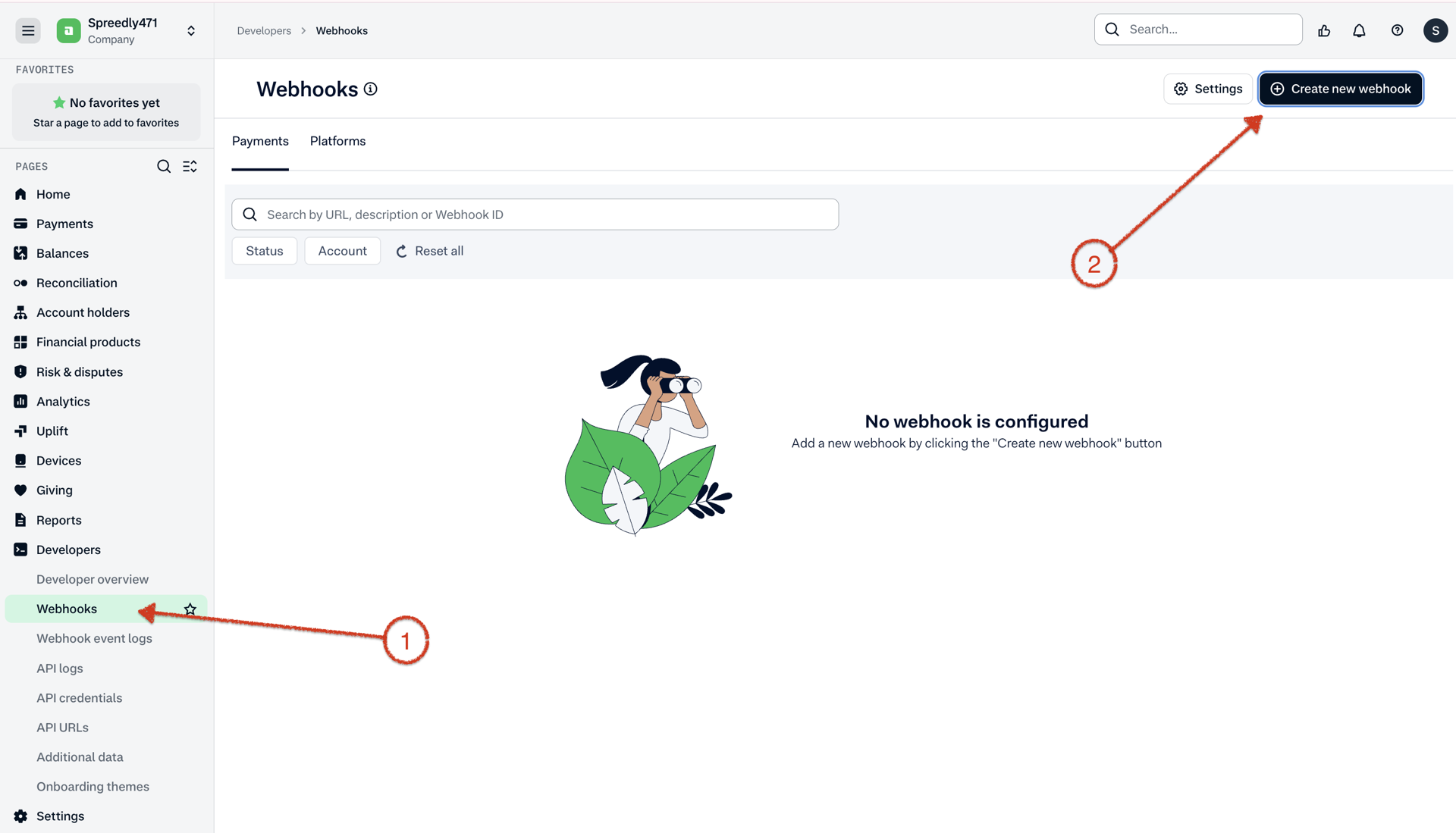
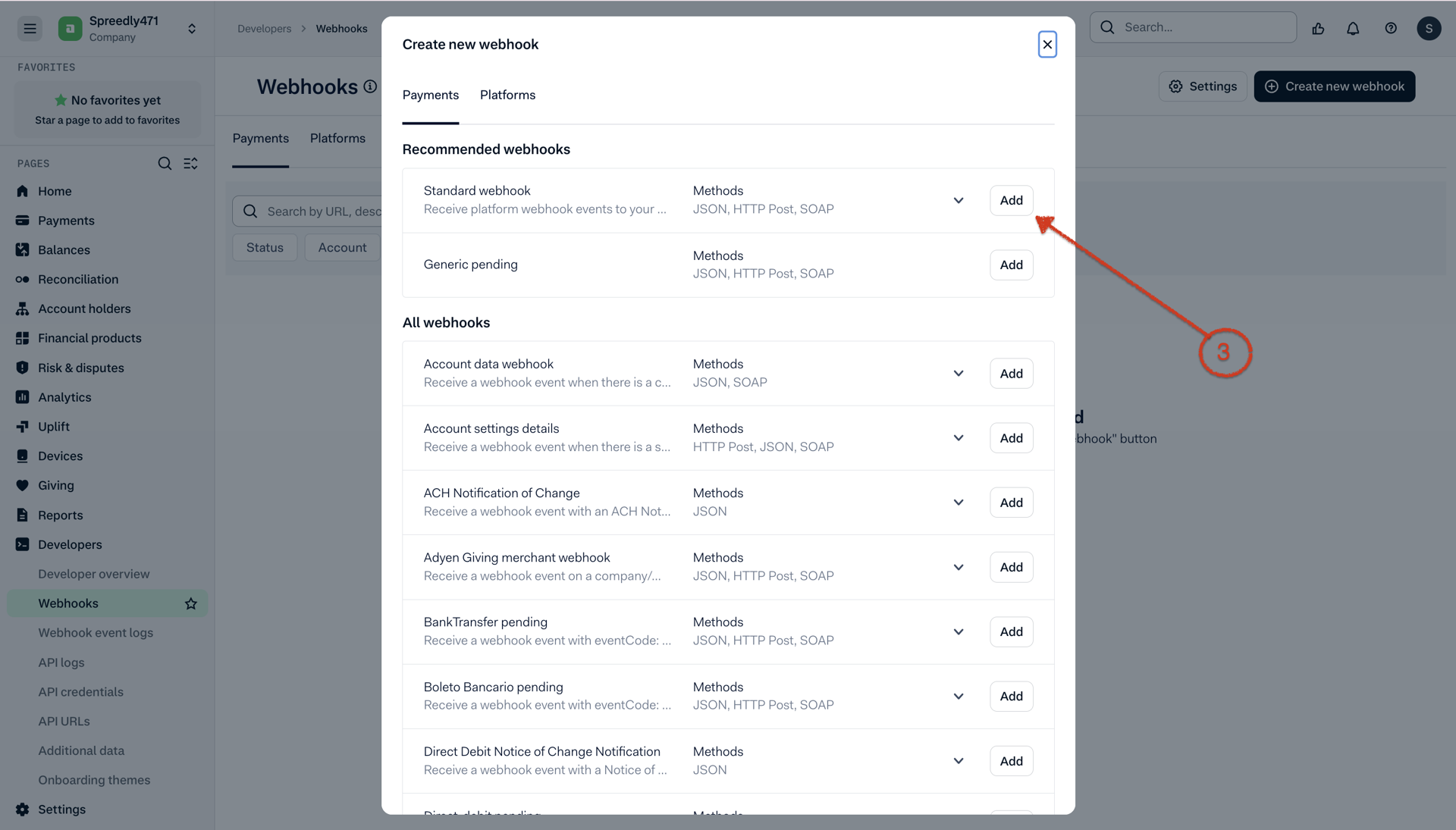
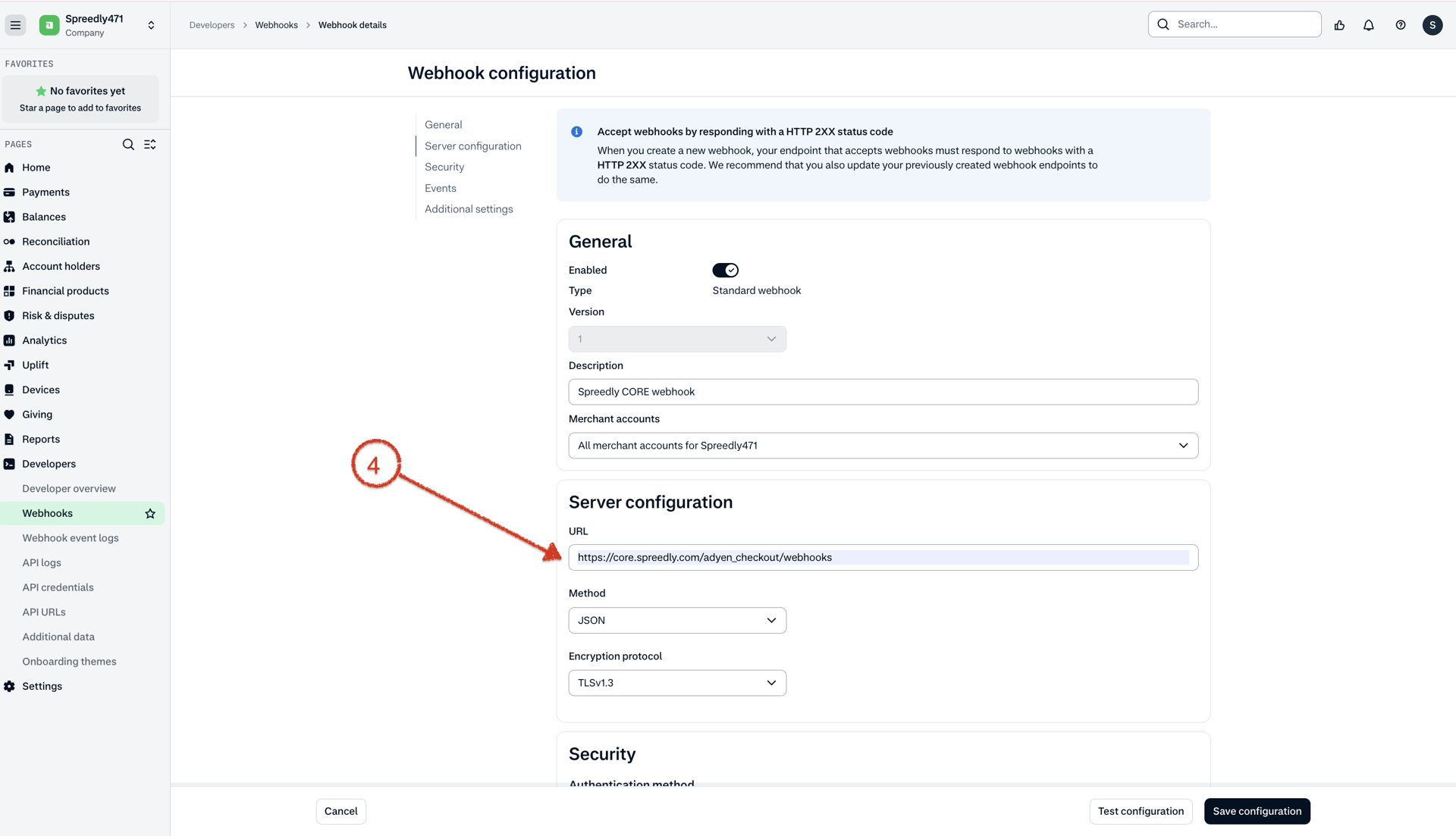
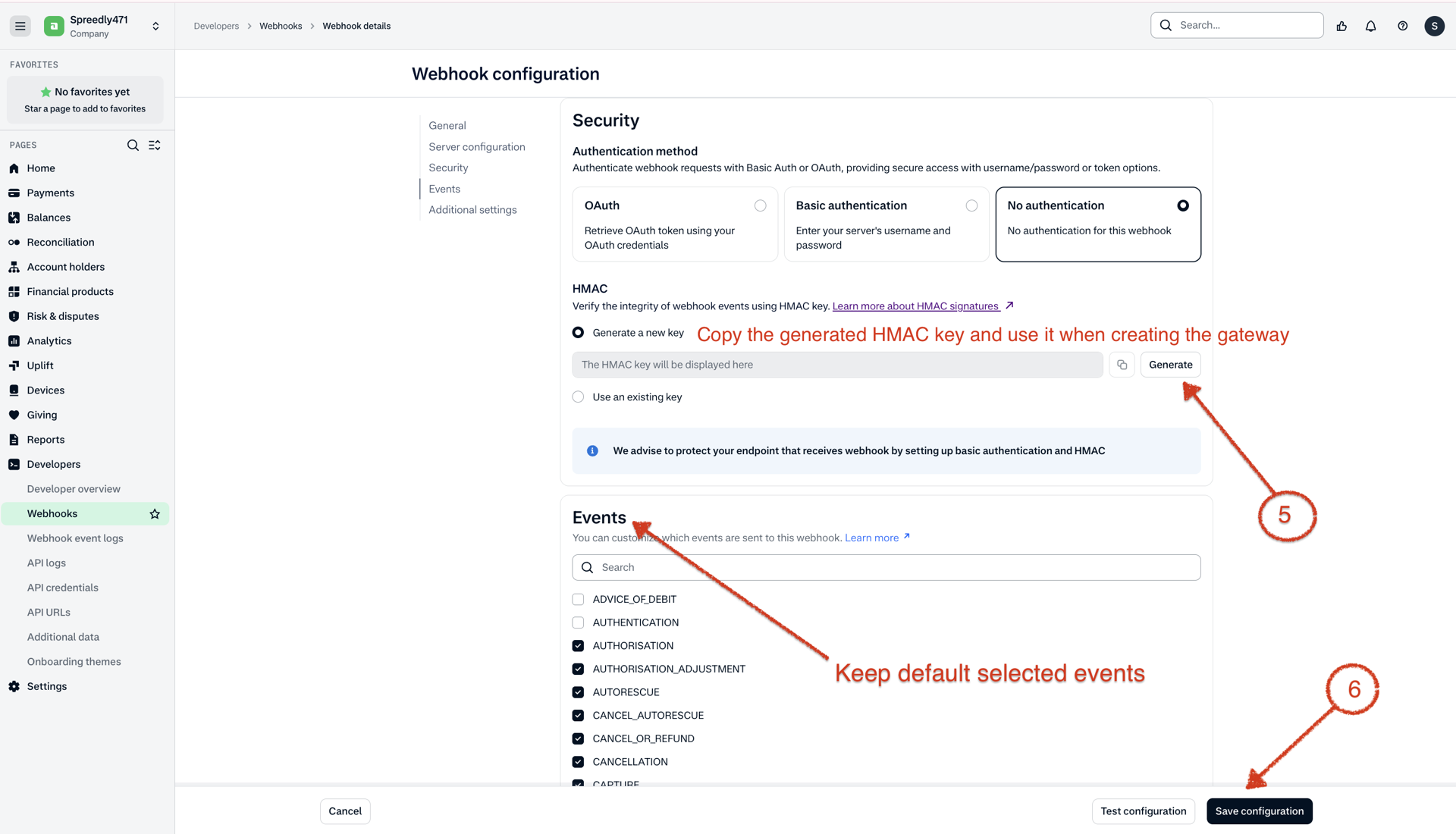
Webhook setup is mandatory for capture, void, and refund transactions.
These operations initially return a processing or received state. Their final outcome is delivered asynchronously:
| Spreedly transaction | Adyen event code |
|---|---|
| Capture | CAPTURE |
| Void | CANCELLATION CANCEL_OR_REFUND |
| Refund (credit) | REFUND |
If the webhook is absent or HMAC validation fails, Spreedly ignores the callback and the transaction remains pending.
Additional resources
If you need support with this gateway please contact Support at [email protected].
Adyen Checkout API: https://docs.adyen.com/api-explorer/Checkout/latest/overview
Adyen webhook HMAC verification: https://docs.adyen.com/development-resources/webhooks/verify-hmac-signatures/
Adyen Transfers API: https://docs.adyen.com/api-explorer/transfers/latest/overview
API Endpoint: https://{subdomain}-checkout-live.adyenpayments.com/ (v71)
Test Endpoint: https://checkout-test.adyen.com/ (v71) (Sandbox)
Updated 2 days ago